
Skills are basically SOPs that tell Claude what to do.
Claude reads these instructions each time instead of winging it from training data.
Skills are folders that include these instructions, scripts, examples, and resources that Claude can use to perform given tasks.
Examples include:
- A written workflow
- PowerPoint templates with placeholders and slide tags
- Excel or Google Sheets templates with named ranges and tables
- Access to specific files or folders
- Optional Python scripts for advanced tasks
Thus:
- Use Skills when you want consistent, branded outputs from labeled templates and structured data.
- However, the utility of the tool depends on the purpose of your automation. If all you do is upload excel templates, to create charts for your board deck and the narrative is revenue is up 5%pts year on year, this is neither insight nor automation.
- Most stand-alone use case I have seen so far are part of sales, onboarding or standardised outward facing processes that don’t need too much recurring information
- Thus add MCP when you want to pull live data from your Datawarehouse, NetSuite or other systems and critically business insights and trends so Claude can really operate value-add.
- However, use Gamma/Pitch for ad-hoc stories, Canva for design-first needs, and ChatGPT Paid for analysis without PowerPoint.
Maximum efficiency: MCP + Skills eliminates the manual data export/import cycle. Once set up, you go from “I need the board deck” to finished slides in minutes, with current data every time.
(See a full comparison for the presentation use case below).
Note: Setup of skills takes a few tries (not 5 mins) at first but can pay off.
Critical limitation: Skills don’t make Claude learn or remember. Each run starts fresh (stateless).
The Report Types:
Realistically, this works very well when you have something very defined workflow and fixed reports or formats. This gets clear when you have a look at the example videos below. For all other use cases it is less useful especially when the data is not connected via MCP.
| Report Type | Best For | How It Works | Limitations / When Not To Use |
|---|---|---|---|
| a) Fixed Reports (Board packs, monthly reviews) | Recurring reports with identical structure and layout. | • PowerPoint template with {{placeholders}} • Excel/Sheets named ranges feed text, charts, and images • Skill reads and fills automatically, exports finished deck | • Layout never changes • Placeholders must match exactly • Complex chart formatting may need a small Python script High ROI once built – most mature use case |
| b) Library / Modular Reports (Master decks with optional sections) | Teams maintaining a single source deck and re-assembling relevant sections each cycle. | • Slides tagged (e.g. [board:intro], [kpi:margin]) • Skill indexes slides, selects those matching scenario rules or API input • Fills data placeholders before export | • Untagged slides ignored • Needs consistent tagging and rule logic • No AI “judgment” — purely rule-based Medium maturity – powerful once tagging discipline exists. Likely not immediately useful for most orgs and will lead to become a) |
| c) Ad-hoc / Custom Reports (One-offs, quick analysis packs) | Rapid custom decks built from pre-labeled content blocks. | • User asks, e.g. “Create churn analysis deck” • Skill searches templates, fills placeholders, assembles slides into new deck | • Needs well-labeled library and consistent naming • No generative layout or storytelling • Slower than fixed workflows for repeat use Low usefulness for most teams – I prefer Custom GPT → Gamma for this as I wrote here |
To summarise:
| Skills Work Well For | Don’t Use Skills For |
|---|---|
| Monthly/quarterly board decks | One-off analysis |
| Investor updates | Creative storytelling |
| KPI dashboards for executives | Design-heavy decks |
| Financial close packs | Ad-hoc exploration |
| Sales/pipeline reports | Anything without MCP connection (defeats the purpose) |
Examples & Links
Further Material
https://www.anthropic.com/news/advancing-claude-for-financial-services
https://www.anthropic.com/news/skills
The Action: So how to create skills?
Anthropic does offer a Skill Library as a starting point. For non-technical users, the easiest path is leveraging the built-in
Claude Skill Builder (see Quick Start below). This feature automates the setup of the written workflow, tags, and data binding—it is the true no-code path.
Otherwise, there are two possible paths, the no-code and the code path.
=> Use Claude’s Skill builder Skill
Quick Start (No-Code)
| Step | Action | Assets Needed |
|---|---|---|
| 1. Prepare Files | Replace static text in your template with placeholders (e.g., Revenue: $4.2M → Revenue: {{revenue_ltm}}). | PowerPoint Template: with {{placeholders}} in the body and [tags] in slide notes. |
| 2. Name Data | In your metrics file, define names for key cells or tables (e.g., cell A1 = revenue_ltm). | Excel / Google Sheet: with data bound to named ranges. |
| 3. Build the Skill | Upload both files to a Claude chat and say: “Help me turn these into a reporting skill. The PowerPoint is my board deck template and the Excel has my metrics.” | Claude’s built-in Skill Builder. Claude will guide you through the process step by step. |
| 4. Run | Say: “Generate this month’s board deck.” | None |
For more details, check out the links above or just ask the AI .
For the code path: clone the skill-creator skill from Anthropic’s library, examine the Python scripts for template manipulation, then adapt the workflow to your CI/CD pipeline. Full docs at docs.anthropic.com/en/docs/build-with-claude/skills
Advanced Action: Connecting Live Data (MCP)
If you need reports that always use current data, the next step is connecting the Model Context Protocol (MCP).
- What it is: A secure bridge that lets Claude call specific functions to pull live, cleansed business data from your Data Warehouse (Snowflake, Databricks).
- Security: This is done by routing Claude -> MCP Server -> Data Warehouse–>ERP, ensuring Claude never touches raw ERP/NetSuite transaction data directly.
- ROI: Low effort for Skill setup, but MCP connection requires 1–2 weeks of developer time for the initial server setup. The payback period is typically under 1-2 months by eliminating manual reporting time.
(Scroll to the end for workflow, security, comparison to Gemini and Open AI etc.)
Presentation Tools Comparison: A lot of information, what am I actually choosing when?
| Capability | Claude + MCP (Skill) | Gamma | Pitch | Canva | ChatGPT Plus / Team |
|---|---|---|---|---|---|
| Purpose | Automated, data-driven decks from templates and ERP data | Fast AI storytelling | Team-based slide creation with AI assist | Design-first visuals | Text and spreadsheet analysis |
| Structure control | ✅ Fixed via placeholders and tags | ⚠️ Semi-random | ⚠️ Semi-fixed | ⚠️ Template-based | ⚠️ Prompt-based |
| Template & data link | ✅ Full PPT + Excel/Sheets binding | ⚠️ Imports only | ✅ Native PPT support | ✅ Native | ⚙️ Manual export; limited control |
| Live data | ✅ Via MCP (read-only server) | ❌ | ⚠️ API integrations | ⚠️ Manual updates | ⚠️ Limited |
| Setup effort | Moderate (template + dev for MCP) | Very fast | Medium | Medium | None |
| Output quality | Brand-tight, deterministic | Good visuals | Polished | Polished | Variable |
| Pricing | $20 + dev setup | Free / $8 Pro | Free / $10 Pro | Free / $15 Pro | $20 Plus / $25 Team |
| Best for | Finance & ops teams automating board packs | Marketing & comms | Start-ups & teams | Designers | Analysts & small teams |
Closing Thoughts:
Skills are useful. They’ll save you hours on recurring reports.
If you think of the current state of AI as working with one of the smartest if not smartest co-workers you have ever used with with strengths and weaknesses, this fits well. You onboard this co-worker, the co-worker does the task. Pretty much end of story.
I think that’s exactly what we should expect at this stage of development.
This isn’t AGI. It’s automation with good guardrails.
Cheers
Niklas
10. Appendix
Skill Types
Claude supports two formats:
| Type | Use When | Example Tasks |
|---|---|---|
| Markdown-only Skills | You only need to structure or format text. | Generating reports, proposals, summaries from templates. |
| Code-enabled Skills | You need to process data or create visuals programmatically (uses Python). | Analysing CSVs, running calculations, creating charts or graphs. |
Rule of thumb: start with markdown; add code only when the task requires data processing or automation.
Skills ≠ Custom GPTs
| **Claude Skills**                        | **Custom GPTs (ChatGPT)**             |
| ---------------------------------------- | ------------------------------------- |
| Run locally or via API                   | Web-only, sandboxed                   |
| Full file and data access                | Limited to chat session               |
| Native PowerPoint & Excel integration    | Manual uploads, no binding            |
| Connects to ERP or DW via MCP            | No direct data connections            |
| Deterministic, rule-based workflows      | Prompt-dependent, variable outputs    |
| **Best for branded, repeatable reports** | **Best for quick analysis or drafts** |
The whole thing about the MCP:
As mentioned, we still operate in a world with uploads and downloads without the MCP and that’s not where we want to end up. So how would that work?
The Workflow
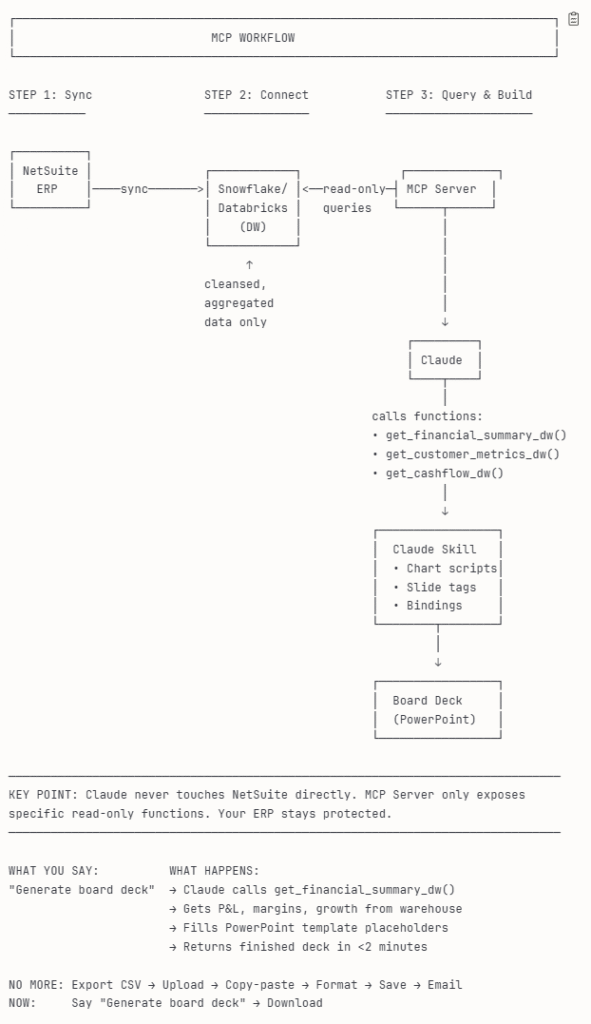
Why Route Through the Warehouse
Performance – Warehouses handle analytical load without touching ERP transaction systems.
Data Quality – DW data is already cleansed, joined, and version-controlled.
Security – Claude and the MCP only see read-only datasets, not live financial systems.
Scale – Once the connector exists, every Skill (board packs, KPI updates, variance reviews) can reuse it.
Security & Access
Security is the main reason to route Claude through the Data Warehouse rather than the ERP.
The architecture enforces a clean separation between systems of record (NetSuite), systems of insight (DW), and systems of interaction (Claude + MCP).
1. Isolation by Design
Claude never connects directly to NetSuite or other production systems.
- MCP Server: the only bridge. It exposes specific read-only SQL views or endpoints, never full database access.
- Data Warehouse: stores sanitized, aggregated data — no sensitive credentials, PII, or operational writes.
- Claude: only receives query results and metadata needed for the reporting task.
This means no ERP keys, tokens, or transaction capabilities ever enter the LLM environment.
2. Understanding Claude’s Security Profile
Claude models are secure at the model level, but not automatically at the data layer.
- When you use Claude Desktop or API, all computation runs in Anthropic’s isolated cloud environment.
- Data sent to Claude is encrypted in transit and at rest, and not used for model training under Anthropic’s enterprise agreements.
- However, the model has ephemeral memory — meaning once a session ends, context disappears — but it still temporarily stores text inputs during active sessions.
- The risk arises if sensitive financial data (e.g., customer PII, raw ledger exports) is passed directly into the model. This is why DW + MCP isolation matters.
3. Enterprise Hardening
To make Claude safe for enterprise financial reporting, apply the following controls:
| Control Area | Best Practice | Effect |
|---|---|---|
| Network Boundary | Host the MCP server inside your VPC or behind a secure API gateway. | Prevents public exposure of query endpoints. |
| Data Scope | Expose only pre-aggregated, non-sensitive views (e.g., revenue by segment, churn %, not customer-level data). | Reduces risk from overexposure. |
| Auth & Roles | Use service accounts or API keys with read-only permissions. Rotate and log all access. | Enforces least privilege and traceability. |
| Audit & Monitoring | Enable query logging in Snowflake/Databricks and server access logs in MCP. | Detects misuse or anomalies. |
| Output Control | Implement sanitization layers in the MCP server (e.g., redact emails, IDs). | Keeps PII out of Claude responses. |
| Claude Versioning | Use Anthropic’s Enterprise or Team tier with data residency controls. | Ensures no data retention or cross-tenant mixing. |
4. Secure Claude Configurations
- Claude Enterprise offers data isolation, SOC 2 compliance, and SSO integration.
- For internal deployments, Anthropic supports self-managed MCP servers and custom policy layers (e.g., block specific query patterns).
- When combined with a DW’s access governance (Snowflake’s RBAC or Databricks Unity Catalog), the setup can meet ISO 27001 and SOC 2 controls.
5. Bottom Line
Claude is secure enough for enterprise reporting if it never touches raw ERP or customer data directly.
The correct boundary is:
Claude ↔ MCP (limited functions) ↔ DW (read-only views) ← NetSuite (source of record).
Implementation Path
1. Build or Reuse an MCP Server
Use open-source connectors such as:
snowflake-labs/mcpfor Snowflake- Databricks-native Managed MCP Servers via Unity Catalog
Both support secure SQL execution and role-based access.
2. Register in the Official MCP Registry
List your server in the Model Context Protocol Registry for discoverability and reuse.
3. Configure Claude Desktop
Add your MCP endpoint; authenticate via token or key-pair.
4. Create or Update Your Skill
Point data calls to DW-based functions.
Example run:
Pull Q4 financials from Snowflake and build board deck.ROI & Effort
| Task | Description | Startup / Analyst Team(Low-code setup) | Data / Engineering Team(Technical setup) | Enterprise / IT Team(Hardened rollout) | ROI Impact |
|---|---|---|---|---|---|
| MCP Server Setup | Connect Claude securely to Snowflake or Databricks | 1–2 days using pre-built servers | 2–5 days to build custom endpoints and auth logic | 5–10 days with API gateway, CI/CD, monitoring | High — removes manual exports immediately; each new report runs automatically |
| Skill Creation | Define prompts, templates, and data bindings | 0.5–1 day if templates exist | 1–2 days for new templates and logic | 2–3 days for multi-department Skill library | High — every Skill becomes a reusable asset for board, KPI, or investor decks |
| Testing & Validation | Validate queries, calculations, and formatting | 1 day | 1–2 days with regression tests | 3–5 days including audit and compliance | Medium–High — ensures deterministic reporting and trust in automated output |
| Optional Hardening | Add CI/CD, governance, observability | — | +3–5 days | +5–10 days | Long-term ROI — audit-ready, secure, scalable for regulated environments |
| Total Implementation Effort | ~2–4 days | ~1–2 weeks | ~2–3 weeks | — | |
| Expected ROI Window | Immediate – eliminates manual deck prep | Short-term – saves 5–10 hrs/report cycle | Long-term – scales org-wide with near-zero marginal cost | — | |
| Typical Payback Period | < 1 month | 1–2 months | 2–3 months | — |
Competitive Analysis: OpenAI and Google
Anthropic’s MCP is not the only path to automated, secure, data-driven reporting.
OpenAI and Google both provide similar ways to connect LLMs to structured enterprise data — but differ in control, flexibility, and compliance posture.
- OpenAI (ChatGPT Enterprise + Actions): best for teams that want fast setup and are comfortable operating fully within OpenAI’s managed environment.
- Google (Gemini + Vertex AI Extensions): best for organisations already on GCP, with strict governance, IAM policies, and BigQuery as their data core.
- Anthropic (Claude + MCP): best for enterprises wanting to self-host or connect multiple systems freely with open standards and full transparency.
All three can eliminate uploads, downloads, and stale data cycles — the only real trade-off is speed vs. control.
| Feature | Claude (Anthropic) | OpenAI | Google (Gemini) |
|---|---|---|---|
| Bridge Mechanism | Model Context Protocol (MCP) | Actions / Connectors | Vertex AI Extensions |
| Workflow Engine | Skills (local or API-based) | Custom GPTs | Gemini Workflows |
| Self-Hosting | ✅ Open-source MCP servers | ❌ Closed platform | ⚙️ Managed within GCP |
| Data Source Focus | Any DW/ERP via open connectors | Limited supported apps or APIs | BigQuery and GCP-native sources |
| Security Posture | Strong, open-source + enterprise options | Strong, enterprise data isolation | Very strong, full IAM & audit stack |
| Flexibility | Highest — user-hosted and extendable | Medium — platform-bound | High within Google Cloud |
| Platform | Key Capabilities | Typical Effort (Initial Setup) | Governance & Security Posture | Scalability & Flexibility | ROI Impact | Best Fit |
|---|---|---|---|---|---|---|
| Anthropic (Claude + MCP) | Open-source MCP servers + Claude Skills + DW integration (Snowflake/Databricks) | Startup: 2–4 days • Engineering: 1–2 weeks • Enterprise: 2–3 weeks | Very high — self-hosted, role-based access, SOC 2 with Claude Enterprise | Highest — works with any ERP or DW | High — deterministic, reusable automation; fastest payback on recurring decks | Mid- to large enterprises needing flexibility and audit control |
| OpenAI (ChatGPT Enterprise + Actions) | Custom GPTs + secure Actions + managed connectors | 2–5 days (no server) | Strong — managed isolation, OAuth, admin portal | Moderate — limited to OpenAI-supported connectors | Medium–High — fast time-to-value for standard use cases | Start-ups or teams wanting no-code simplicity |
| Google (Gemini + Vertex AI Extensions) | Vertex Extensions + BigQuery + Workspace Apps | 1–2 weeks (depending on IAM setup) | Highest — native IAM, audit logs, in-region processing | High — excellent within GCP, less open across clouds | High (Long-Term) — secure automation, enterprise compliance | Organisations already using GCP or BigQuery |
Summary:
All three achieve the same outcome — automated, live, and compliant reporting — but approach it differently:
- Claude (MCP) gives you the most control.
- OpenAI gives you the fastest setup.
- Google Gemini gives you the strongest compliance boundary.